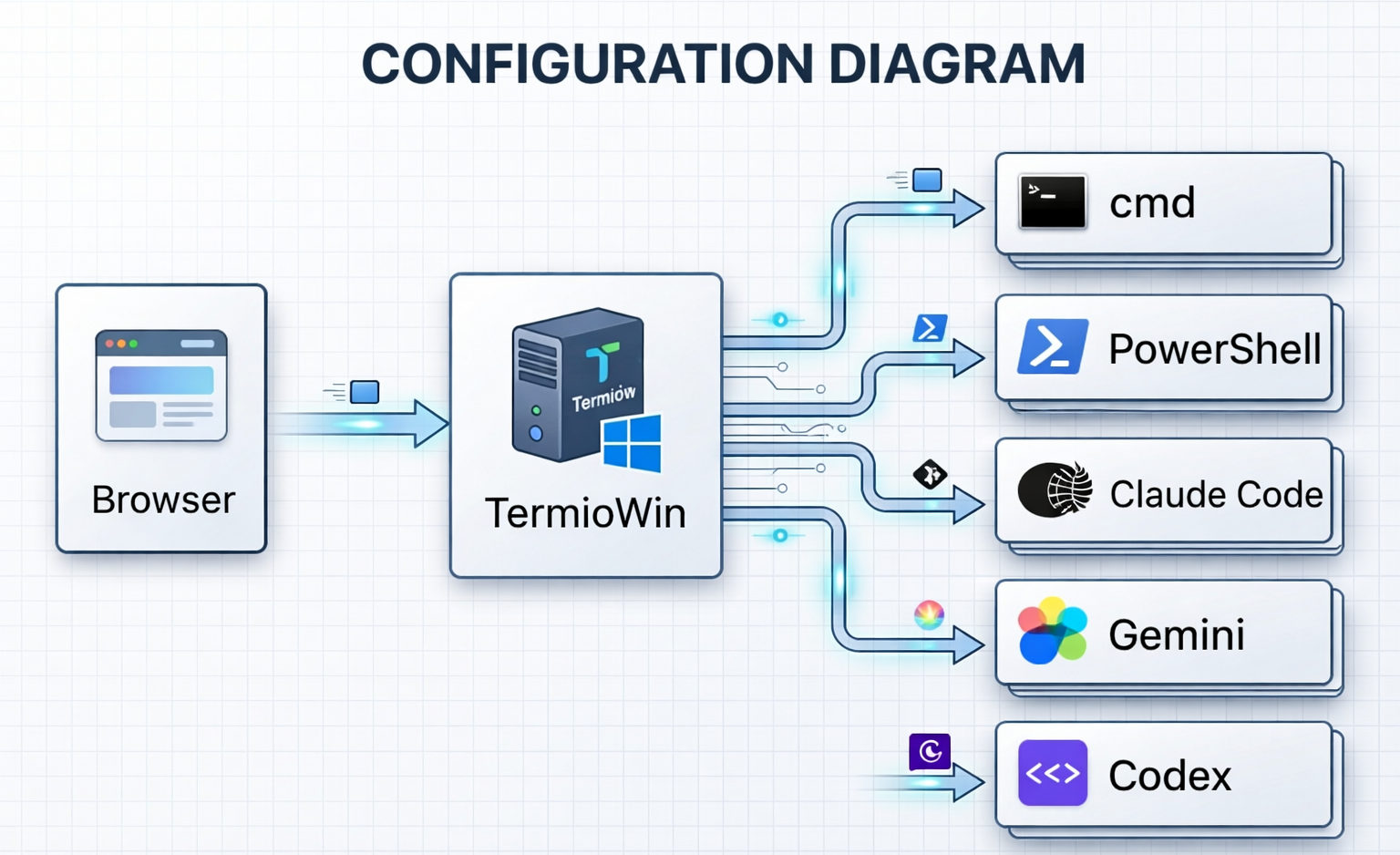
A terminal server for Windows — operated from any browser
TermioWin runs as a lightweight server on your Windows PC.
Any browser on the same network can connect, log in with your Windows account,
and start using the full set of Windows command-line tools — instantly.
1
Install TermioWin
Download the installer from this page and run it. TermioWin starts a local server on your Windows PC — that's it.
→
2
Open your browser
Navigate to the TermioWin address from any browser — Chrome, Edge, Firefox. Log in with your Windows password.
→
3
Use any CLI tool
cmd, PowerShell, Git, Python, Node.js — every command-line tool installed on your Windows PC is available immediately.
cmd.exePowerShellGitPythonNode.jsWSLSSH+ any installed tool
Multi-Workspace
Multiple windows, multiple tasks
Split your terminal into multiple panes and tackle several tasks in parallel.
Open additional browser tabs for independent workspaces — each with its own shell sessions, layout, and working directory.
Pane splitting — arrange terminals side-by-side or stacked, any way you like
Saved layouts — save up to 5 workspace configurations and switch instantly
Multi-tab — open new browser tabs for fully independent workspaces, sharing the same server
Session persistence — close a tab and reopen it; your sessions are still running
Command Completion
Smarter commands, fewer keystrokes
As you type in the Input Bar, matching suggestions appear instantly — no manual lookup needed. Works for AI CLI slash commands and every supported shell.
AI slash commands — type / for instant Claude Code, Gemini CLI, Codex CLI, Copilot, and Cursor completions
Shell commands — CMD, PowerShell, Git Bash, and WSL commands suggested by prefix
git & gh — full command and subcommand suggestions for git and GitHub CLI
700+ built-in entries — covering all shell profiles, with recently used commands surfaced first
Built from the ground up for Windows — not ported from Linux or macOS.
Native Windows Authentication
Authenticates with your existing Windows account via LogonUserW. No separate password to remember, no data sent to third-party services.
LogonUserW API
Session Resilience
Close your browser, lose Wi-Fi, or reboot the client — your terminal session keeps running. Reconnect and pick up exactly where you left off.
Output Buffer 256 KB
Ultra-Low Latency
Direct PTY integration with no extra processing layers. Commands execute at native speed, making TermioWin as fast as any local terminal.
Native PTY
Multi-Workspace
Save up to 5 workspace layouts with custom pane splits. Open multiple browser tabs, each with its own independent workspace and history.
Up to 10 workspaces
TLS Encryption
Enable HTTPS with a self-signed certificate generated automatically on first run. Secure remote access over any network with minimal setup.
Self-signed cert
Local-First Privacy
All application processing happens on your machine. The TermioWin application itself includes no telemetry, no cloud sync, and no third-party analytics. Your terminal is yours alone.
Zero telemetry
AI-Ready: MCP Server
Designate one AI assistant running inside TermioWin as a command hub to send instructions to AI assistants in other terminals. The hub AI can also monitor all terminals by reading their output in real time.
MCP Protocol
Auto-Detected Shells
Automatically discovers PowerShell 7, Git Bash, MSYS2, Cygwin, and WSL distributions. Pick from a dropdown — no configuration needed.
CMD · PS7 · Git · WSL
Built-in Viewer Pane
Open Markdown, PDF, HTML, or text files in a terminal pane. File watching auto-refreshes content as files change on disk.
Markdown · PDF · HTML · URL
Prompt Flow & Auto-Approval
Queue multiple prompts and templates, then send them to any AI CLI automatically — one after another. Auto-Approval detects when the AI finishes and fires the next prompt without human interaction.
Professional · Enterprise
Webhook / CI Triggers
Trigger terminal sessions and commands from external systems via HTTP POST. Integrate with GitHub Actions, Jenkins, or any CI/CD pipeline to automatically launch your AI workflow when a build completes.
GitHub Actions · Jenkins · Professional
Snapshots
Automatically saves a Git snapshot of your project folder each time you run a command — so you can roll back to any point in time. Stored in a separate area that does not interfere with your existing repositories.
TermioWin is built with enterprise security requirements in mind from day one.
Local Processing Only
Authentication and terminal I/O never leave your machine. All data stays within your Windows environment.
SHA-256 Verified Distribution
Every release includes a published SHA-256 checksum so you can verify file integrity before installing. Download directly from our official site — no third-party stores or intermediaries.
No Cloud, No Account
Personal use requires no account, no registration, no email. Enterprise license activation is a one-time event — after that, TermioWin runs fully offline.
Auditable Open Architecture
Single binary, no hidden services. Data stored only in %APPDATA%\TermioWin\. Easy to inspect, easy to uninstall, easy to audit.
The only external connection TermioWin makes is to Lemon Squeezy during initial Enterprise license activation. After activation, the app runs entirely offline. This is disclosed in the Privacy Policy.